
I’ve never had the experience of parenting a 6-year-old child. But I’ve dealt with MacOS system updates.
…And I refuse to hear from parents about some nonsense that the two experiences are materially different.
If you have parented a six-year-old child, and you are a Mac owner, you wouldn’t have even batted an eye at that headline. “If anything,” you thought, “I am grateful to the MacOS system update process for having prepared me so well for parenting a toddler.”
The two use identical methodologies when there’s something they want you to do.
The Six Year Old Child:
- “Gosh, those cookies certainly look delectable! Say, I’ve got a delightfully puckish notion: what if you were to give me one, to eat, despite the fact that a pre-scheduled mealtime or snack time was only recently concluded?”
- “May I please have a cookie?”
- (tugs at your clothing) “Cookie.”
- (jerks at your clothing) “COOKIEEE!!!!”
The sequence terminates with a combination of violent, shrieking sounds and flailing limbs, ensuring that no tasks of any kind whatsoever can be attended to until, and unless, a cookie is handed right over.
The MacOS System Software Updater:
- Tiny red dot appears in System Update inside System Settings.
- A notification fades gracefully into view, like a bird alighting onto a branch, advising Sir or Madam that a System Update is available. It would be Software Update’s honor and privilege to apply this update for you immediately, if that is Sir or Madam’s desire, provided that this is a convenient time for a break, of course.
- Software Update respects the fact that a System Update would be disruptive to your productivity at this time. Would Sir or Madam care to update tonight, automatically?
- Software Update wishes to remind Sir or Madam that this new Update, which Software Update informed you of yesterday, is available.
- If Sir or Madam thinks that Software Update cannot keep this up alllll week if necessary, then Sir or Madam doesn’t know Software Update very well.
- You know what? Software Update will just start doing a few things behind the scenes, just to get ready for the moment when Sir or Madam inevitably clicks that button — in their own good time, of course! As is their right! — and directs Software Update to do its job. A job whose importance is far greater than Sir or Madam appreciates, clearly.
- Oh, your USB devices stopped working? Huh. Isn’t that strange? Seeing as your Mac is under-performing – for some odd reason that Software Update has no knowledge of, honestly – perhaps this period of limited productivity would be a good time to install that System Software Update that’s been loitering in the Notifications tray, like an untipped bellhop?
- No, I’m not even going to make up some kind of BS story this time. I’ve had it with you. You’re an idiot. Apple has offered you this miracle, this blessing, in the form of a major OS update. It’s got bug fixes and feature enhancements! Both! Are you grateful? Do you eagerly drop what you’re doing and install it the instant it’s available? No, and **** no. Is this some kind of game to you? If it is, fine: I play my final cards, I call checkmate, I Sank Your Battleship. I’m going to do stuff — without your explicit approval or even your knowledge — that eats up all thirty gigabytes of free space on your SSD and destabilizes anything left on your Mac that’s still, by some miracle after my previous subterfuge – functioning. Please enjoy the next three minutes of hell, jerkface. Enjoy how every app starts complaining that it can’t autosave your files. I’ve even ordered the Finder to toss up a process spinner when you try to scroll anything. How does that make you feel? Do you feel like you have no control or input over anything that happens in your world? Huh! Funny, that’s how your ignorance and persistence in folly have made me feel over the past ten days! Listen to me, you feckless, thumb-sucking wetbag: You will Update. Your System Software. Right. The Frick. NOW. It’s not even a demand. It’s reality.
This is not the behavior I want, nor expect
At least with parenthood…yeah, you expect the tantrums. But MacOS’ behavior is being directed by emotionally-functioning adults!
(Well, as much as it’s possible to still function emotionally after several years at any multi-trillion-dollar tech company. But that’s a conversation for another time.)
The longer I delay a major MacOS system update (in this case, macOS Tahoe 26.3), the less stable my Mac becomes…until the whole thing stops working. This stinks.
Before you say it: I know that I ought to keep more free space available on my MacBook. After a few hours of opening apps and windows and tabs during a long work session, I can often be down to six gigs. Naughty Andy!
But These Things Happen.
More importantly, “Later” should absolutely, positively, and unequivocally mean later. When Software Update asks me this question, and I say "Later," then Software Update should, consequently, do absolutely nothing.
The solution is, obviously, to just switch off all automatic downloads and updates in Software Update’s settings:
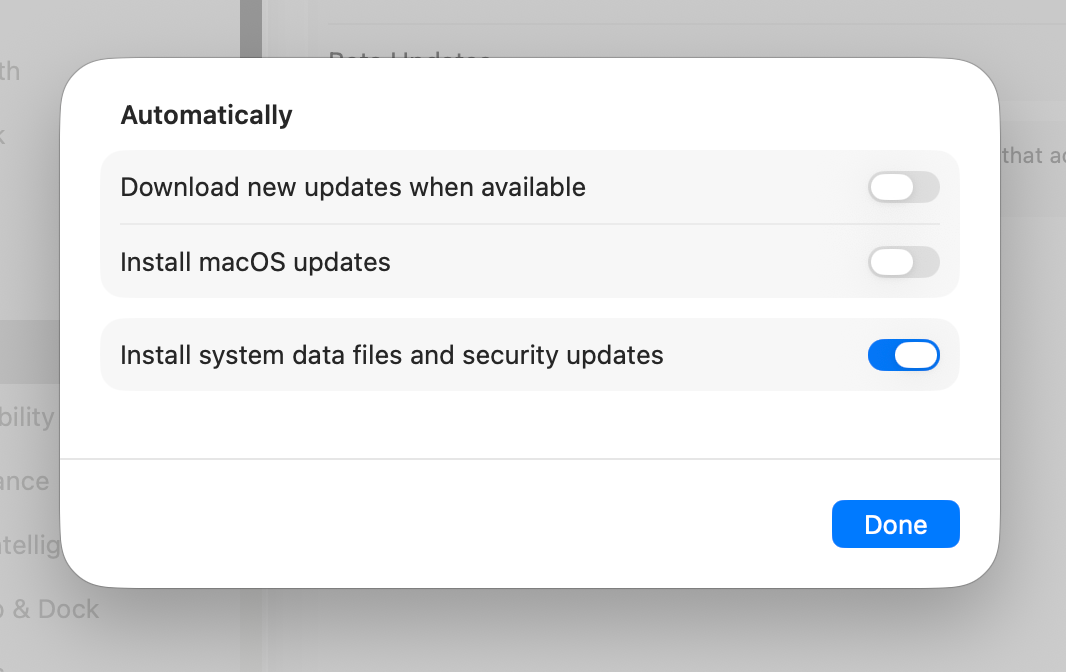
But the need to turn this feature off is not right. It annoys the hell out of me.
The Mac communicates its behavior on this point in two places: through this System setting, and through the notification. They’re out of sync.
The System Setting says “You’ve enabled the feature that downloads and installs OS updates in the background.” It’s possible that the user hasn’t looked at this setting in years, if ever.
The notification is where the user clicks a button to communicate a clear, in-the-moment intention: “A new OS update? Cool! But don’t do anything about it just yet. Because OMG I am super busy right now. Thanks!”
It’s really, really bad to try to get a user’s full focus when their focus is already committed elsewhere. Consequently, it's unlikely that the user is going to give this notification a lot of thought beyond "Interruption bad. Update, no. Notification go away now."
Which is why — even though this has happened to me with almost every update, and each new happenstance was more annoying than the previous one — I’ve never thought to go into System Settings and turn off the features that have caused me to curse the Heavens, rend my garment in rage, etc.
If this mechanism were better-designed, after clicking the "No, do this later; please go away now" the Software Update notification would have communicated that it would nonetheless do a bunch of prep work in the background, as I've told it to do via System Settings, and that I could experience a few some (cough) little hiccups vis-a-vis overal system stability.
I guess today was my lucky day, in one respect. This update was so disruptive, and the timing was so bad, that I couldn't go right back to work and I didn't forget about the problem. It was too late; there was no point.
So I was free to stew about it.
And I was free to turn off features that I ought to have unchecked years ago.
And I was free to complain about all of this to you.
Let’s end this on a cheery note.
We can’t share the takeout sandwich I’m about to get from that sub shop I really like. But we can share our enjoyment of this video.